 Slae.ru
EMT 1496: Power BI Desktop: Allocate Invoice Header Amounts To Transaction Line Item Table
 Канал: Таблица умножения: игровой подход к математике | Категория: Обучение | 29.12.2023 | Просмотров: 8
Download Excel Files: Start: Finished:
Entire page with all Excel Files for All Videos:
In this video learn how to take Invoice Shipping and Discount Amounts from an Invoice Level Header Transaction or Fact Table and allocate those amounts to the Invoice Line Item Level Fact Table so we can use the Line Level Product Criteria Filter to create a Shipping and Discount Amount Report by Product.
This is a typical business problem where the grain granularity of the two Transaction Fact Tables is different and in order to use a filter or condition criteria from the Line Level Transaction Fact Table we must first allocate the Header Level amounts to the Line Level.
In this video we use Power BI Desktop to allocate Header Invoice Level Amounts down to the Line Item Level Table using both DAX Formulas and Functions and Power Query Functions M Code then we create our Interactive Visualizations.
Topics:
1.
00:06 Introduction
2.
01:04 Differences in Power BI Desktop Power Pivot Excel
3.
01:21 What we need to do to Allocate the amount in Power BI Desktop DAX
4.
03:23 See how to use Edit Queries to access Power Query in Power BI Desktop and Use Add Columns multiply feature to create a Custom Column to calculate Line Sales in the Line Item Table using the Power Query Function M Code Table.AddColumn
5.
06:48 Sort a column in Power Query
6.
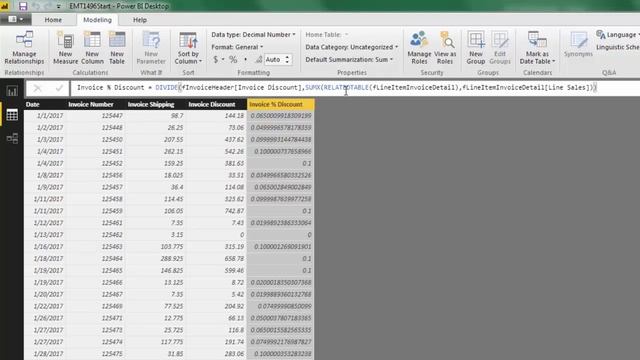
07:10 Add Invoice Discount DAX Calculated Column in the Header Table using DIVIDE SUMX RELATEDTABLE DAX Functions
7.
9:20 Add Invoice Weight DAX Calculated Column in the Header Table using SUMX RELATEDTABLE RELATED DAX Functions
8.
11:00 DAX Calculated Column for Line Discount using multiplication and DAX RELATED Function
9.
11:30 DAX Calculated Column for Line Shipping using multiplication three DAX RELATED Functions in the same formula!!!
10.
12:40 The different Power BI Icons for Measure Calculated Columns as compared to Excel Power Pivot.
11.
12:57 Create Measures in Power BI Desktop.
Measures for Total Discount Shipping
12.
14:27 Hide Tables and Columns so they are hidden in Report View
13.
15:33 Create Interactive Visualization for Discount Shipping by Product.
14.
17:40 Summary
Related Videos:
EMT 1493: Excel Formulas PivotTable: Allocate Invoice Header Amounts To Transaction Line Item Table
EMT 1493 Part 2: Excel Array Formulas Allocate Invoice Header Amounts To Transaction Line Item Table
EMT 1494: DAX Power Pivot: Allocate Invoice Header Amounts To Transaction Line Item Table
EMT 1495: Power Query: Allocate Invoice Header Amounts To Transaction Line Item Table
EMT 1495 Part 02: Power Query w Group By Rows: Allocate Invoice Amounts To Line Item Table
EMT 1496: Power BI Desktop: Allocate Invoice Header Amounts To Transaction Line Item Table
EMT 1497: Vote For Your Favorite Allocate Invoice Header Amounts To Transaction Line Item Table
Search terms in this video: Header Detail Granularity Reporting Problem Invoice Level Invoice Detail Level Mismatch Invoice Granularity Mismatch Reporting Issue Granularity Invoice Reporting Problem: Invoice Total Invoice Detail Reporting Invoice Shipping Discount at Invoice Detail Level? Allocating Invoice Totals to Invoice Detail Level Granularity Reporting Problem Header Detail Granularity Reporting Invoice Example HeaderLine Item Transactions Header Line Item Transactions Reporting Issues Allocating Invoice Shipping Discount to Product Report Allocating Invoice Shipping Discount to Invoice Line Level Allocating Invoice Shipping Discount to Invoice Line Level Two Fact Tables Different Granularity How To Allocate Header Amounts to Line Item Fact Table so we can Slicer by Product? Allocate Invoice Header Amounts To Transaction Line Item Table Two Transaction Tables Different Granularity Slice Report by Product
Excel Magic Trick 1496
Похожее видео

⇒Расскажите об этом видео EMT 1496: Power BI Desktop: Allocate Invoice Header Amounts To Transaction Line Item Table, своим друзьям в социальных сетях.
Ссылка на страницу с видео:
HTML-ссылка на страницу с видео:
Код для вставки плеера:*16 Ноября 2022, 00:50 | Алина Пишет: По-моему таких давно уже нет в ходу нигде, только как музейные экспонаты остались, верно? От фотографии сразу веет таким... винтажом что ли, атмосферой того времени. Уже ретро. ... Подробнее...
*16 Ноября 2022, 09:30 | Стас Пишет: Это как другой мир. Столько моделей из прошлого. Выглядят они по разному. Для тех кто в возрасте они навевают ностальгию, а для молодых это просто старые модели без иноваций и наворотов.... Подробнее...
*15 Ноября 2022, 21:04 | Анна Пишет: Нравится мне пеночка, это видео расширило мне понимание о ней. Ребятам тоже понравится, если такое включить. Диктор хорошо говорит, понятно, заинтересовывает рассказом. Видеоряд подобран классно. ... Подробнее...
*16 Ноября 2022, 11:06 | Юра Пишет: Машина легенда своей эпохи. Это сейчас она смотриться не очень, но в свое время это был прорыв. Простая и надежная машина для людей. Вроде хотят возродить этот бренд под новым авто.... Подробнее...
*16 Ноября 2022, 03:27 | Михаил Пишет: Посмотрев на фото мотоколяски, как будто в детство окунулся. У меня дед в те советские годы на такой ездил. Сейчас такие модели считаются раритетными и стоят больших денег для коллекционеров.... Подробнее...
*15 Ноября 2022, 21:18 | Марго Пишет: Не особо разбираюсь в машинах , судить могу только по внешним параметрам , и это очень красивая машина хоть и ретро , было бы классно сделать фотосессию в интересном стиле с такой машиной ) ... Подробнее...
*16 Ноября 2022, 08:23 | Татьяна Пишет: Крутые коврики! Тоже такие используем.... Подробнее...
*16 Ноября 2022, 20:18 | Олег К. Пишет: Обычная ситуация, когда именно трамвай транспортирует другой трамвай с поломкой в депо. Есть специальная техпомощь на рельсах, но в данном случае в ее роли выступил пассажирский трамвайчик. ... Подробнее...